Bugtrax
Bugtrax provides our programmers and clients with an on-line forum to keep track of jobs, tasks, change orders, bugs and more.
When you start a new project with Software Science, a new Bugtrax account is created. During the development phase of your project, you can record your ideas, thoughts, action items, task specifications and so on into Bugtrax. Bugtrax then keeps track of the work done on this specific item and notifies you automatically via email when progress occurs. The overview screen of Bugtrax gives you an immediate bird's eye view of the status of your project, showing you all the currently active tasks of your project, and can optionally list all the completed tasks.
Try
Bugtrax now. By clicking on the link to the left, you can visit
the management of a sample project and view the project at the global
level (list of tasks) or view the activity for each task. For this
sample project you can enter your own comments and entries, just as
you would your own projects.
Here is a sample overview screen shot:
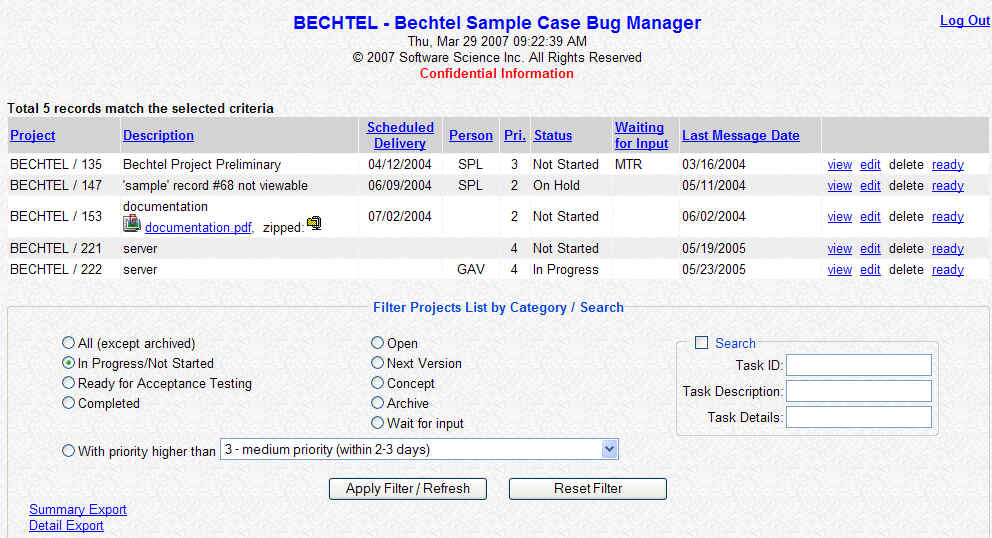
By clicking on the "view" or "edit" links, you an review the history of a particular task, and make additional notes. For example:
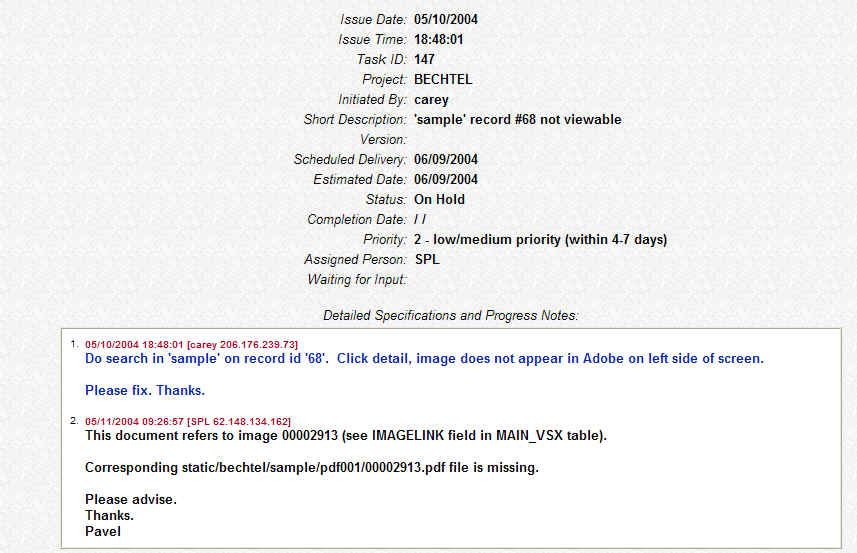
In this example the customer reports a bug regarding a particular feature of the program. The programmer investigated the issue and responded in a subsequent paragraph. Often times a task can have a lengthy and detailed thread involving management, programmers and customers as the particulars of a task are specified and progress accomplished. The customer has a running commentary and history of every task in his or her project, has the ability to search the historical record, and has complete control over priorities, scope of work and so on.

|
